LG IPLDK - IP connection
These instructions help you configure your LG IPLDK phone system to work with TIM Plus. Contact your system maintainer if you are not familiar with the configuration of your PBX.
Support files
Ensure the following support files exist in the /config/ folder of the TIM Plus application:
LG.TDS
LG IPLDK.TDT
If not please contact support for a copy.
Contents
Configuring the SMDR output
You may need to purchase a license to enable SMDR on this PBX. Please speak to your system maintainer if you are unsure.
The SMDR output on the LG IPLDK is disabled by default. To enable the output, you need to amend the following settings in the programming sections below:
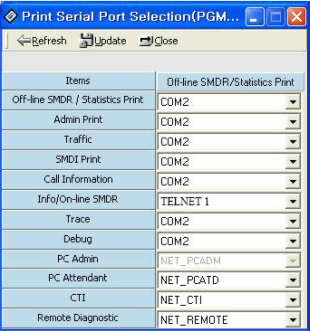
Print Serial Port Selection (PGM 175)
In this window, set Info/On-line SMDR to Telnet 1 to send call logging data to TIM Plus over TCP to port 23.
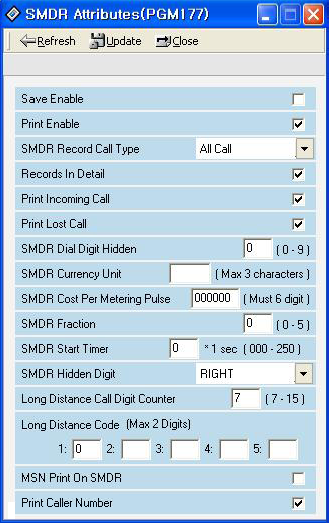
SMDR Attributes (PGM 177)
Set the SMDR Attributes as shown below:
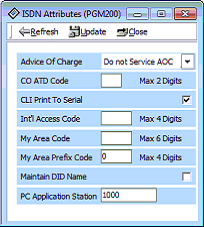
ISDN Attributes (PGM 200)
Set the ISDN Attributes as shown below, ensuring that the CLI Print to serial field is enabled:
Configuring TIM Plus
Follow the steps below to configure TIM Plus to connect to your LG IPLDK:
If your LG IPLDK has been configured to send its call logging data via TCP/IP, follow the steps below to configure TIM Plus:
- Click on the
Directorytab. - If you don't have a site set up, press
Addand selectPBXfrom the drop-down menu. In the dialogue window, name your site and then selectAdd.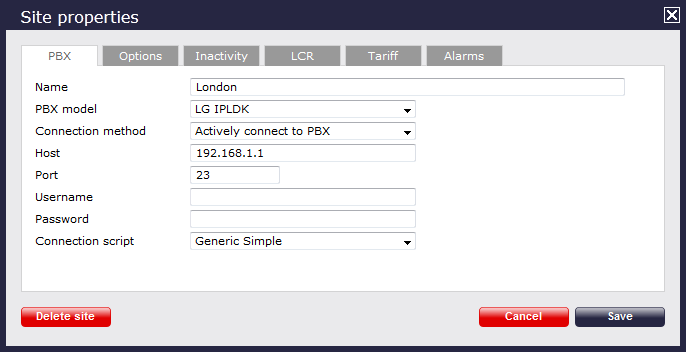
- In the Site Properties window, select LG IPLDK from the PBX model drop-down list.
- In the Connection method field, select Actively connect to PBX from the drop-down list.
- In the Host field, enter the IP address of your LG IPLDK.
- In the Port field, enter 23.
- Leave the Username and Password fields blank.
- In the Connection script field, select Generic Simple from the drop-down list.
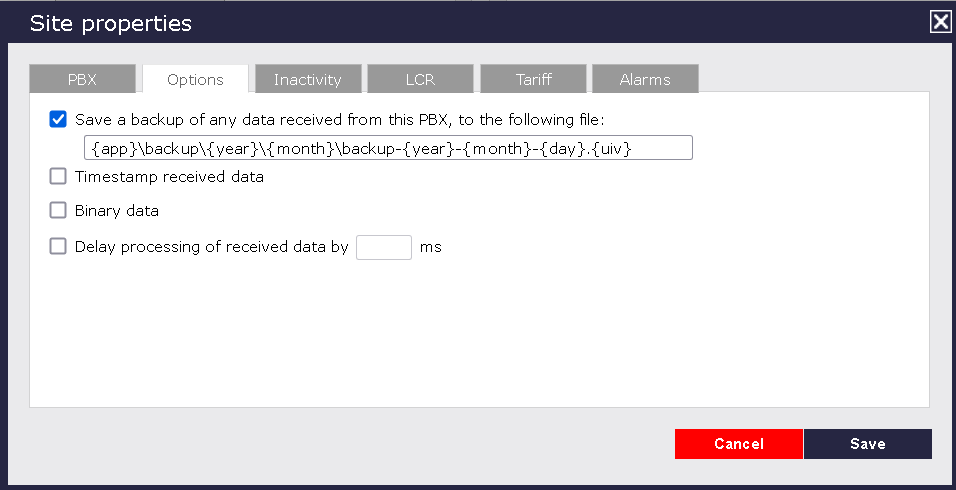
- Click on the 'Options' tab and tick the Keep a local backup of any data tickbox, as shown below
- Click on the
Savebutton to apply the settings.